Posts

Web UI Testing Made Easy with Zalenium

Image
I so far was always afraid to mess with UI tests and SeleniumHQ . Thanks to Zalenium , a dockerized "it just works" Selenium Grid from Zalando, I finally managed to start writing UI tests. Zalenium takes away all the pain of setting up Selenium with suitable browsers and keeps all of that nicely contained within Docker containers ( docker-selenium ). Zalenium also handles spawning more browser containers on demand and even integrates with cloud-based selenium providers ( Sauce Labs , BrowserStack , TestingBot ). To demonstrate how easy it is to get started I setup a little demo project  (written in Python with Flask ) that you can use for inspiration. The target application is developed and tested on the local machine (or a build agent) while the test browsers run in Docker and are completely independent from my desktop browser: A major challenge for this setup is accessing the application that runs on the host from within the Docker containers. Dockers network isolat...

Setting Custom Page Size in Google Docs - My First Published Google Apps Script Add-On

Image
While Google Docs is a great productivity tool, it still lacks some very simple and common functionality, for example setting a custom page size. Google Slides and Google Drawings allows setting custom sizes, but not Google Docs . Luckily there are several add-ons available for this purpose, for example Page Sizer is a little open source add-on on the Chrome Web Store . Unfortunately in many enterprise setups of G Suite access to the Chrome Web Store and to Google Drive add-ons is disabled for security reasons: the admins cannot white-list single add-ons and are afraid of add-ons that leak company data. Admins can only white list add-ons from the G Suite Marketplace . The Google Apps Script code to change the page size is actually really simple, for example to set the page size to A1 you need only this single line of code: DocumentApp. getActiveDocument(). getBody(). setAttributes({ "PAGE_WIDTH": 1684, "PAGE_HEIGHT": 2384 }); To solv...

Eliminating the Password of Shared Accounts

Image
Following up on " Lifting the Curse of Static Credentials ", everybody should look closely at how they handle shared accounts, robot users or technical logins. Do you really rotate passwords, tokens and keys each time somebody who had access to the account leaves your team or the company? Do you know who has access? How do you know that they didn't pass on those credentials or put them in an unsafe place? Update : In May 2024 I gave a talk about this ( Video ,  Slides ): For all intents and purposes, a shared account is like anonymous access for your employees. If something bad happens, the perpetrator can point to the group and deny everything. As an employer you will find it nearly impossible to prove who actually used the password that was known to so many. Or even to prove that it was one of your own employees and not an outside attacker who "somehow" stole the credentials. Thanks to identity federation and federated login protocols like SAML2 and...

Using Kubernetes with Multiple Containers for Initialization and Maintenance

Image
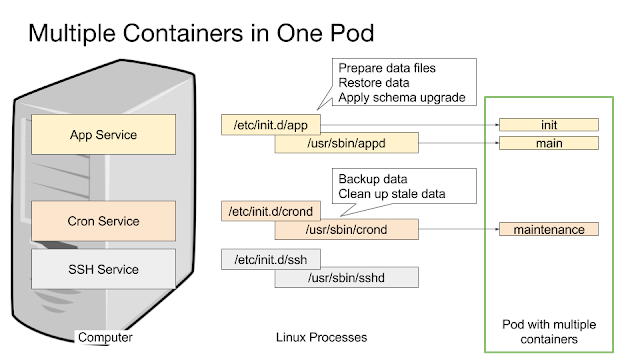
Update 23.04.2018: Added demo and link to conference talk video/slides at the end of this article Kubernetes is a great way to run applications because it allows us to manage single Linux processes with a real cluster manager. A computer with multiple services is typically implemented as a pod with multiple containers  sharing communication and storage : Ideally every container runs only a single process. On Linux, most applications have three phases with two different programs or scripts: The initialization  phase, typically an init script or a systemd unit file. The run  phase, typically a binary or a script that runs a daemon. The maintenance  phase, typically a script run as a CRON job. While it is possible to put the initialization phase into a Docker container as part of the ENTRYPOINT script, that approach gives much less control over the entire process and makes it impossible to use different security contexts for each phase, e.g. to prevent ...

Working with IAM Roles in Amazon AWS

Image
Last week I wrote about understanding IAM Roles , let's follow up with some practical aspects. The following examples and scripts all use the  aws-cli  which you should have already installed. The scripts work on Mac and Linux and probably on Windows under  Cygwin . To illustrate the examples I use the case of an S3 backup bucket in another AWS account. For that scenario it is recommended to use a dedicated access role in the target AWS account to avoid troubles with S3 object ownership. AWS Who Am I? The most important question is sometimes to ascertain the identity. Luckily the aws-cli provides an option for that: $ aws sts get-caller-identity {     "Account": "123456789",     "UserId": "ABCDEFG22L2KWYE5WQ:sschapiro",     "Arn": "arn:aws:sts::123456789:assumed-role/PowerUser/sschapiro" } From this we can learn our AWS account and the IAM Role that we currently use, if any. AWS Assume Role Script The following Bash s...

Understanding IAM Roles in Amazon AWS

Image
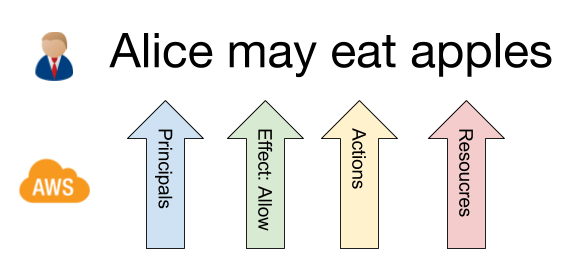
One of the most important security features of Amazon AWS are IAM Roles. They provide a security umbrella that can be adjusted to an application's needs in great detail. As I all the time forget the details I summarize here everything that helps me and some useful tricks for working with IAM Roles. This is part one of two . Understanding IAM Roles From a conceptual perspective an IAM Role is a sentence like Alice may eat apples : It grants or denies permissions (in the form of a access policy ) on specific resources to principals. Alice is the principal, may  is the granting, eat  is the permission (to eat , but not to look at ) and apples  is the resource, in this case any kind of apples. IAM Roles can be much more complex, for example this rather complex sentence is still a very easy to read IAM Role: Alice and Bob from Hamburg may find, look at, smell, eat and dispose of apples № 5 and bananas . Here we grant permissions to our Alice and to some Bo...

Root for All - A DevOps Measure?

Image
Who has root access in your IT organizations? Do you "do" DevOps? Even though getting root access was once my personal motivation for pushing DevOps, I never considered the question of the relationship till it was triggered by my last conference visit. Last week I attended the 10. Secure Linux Administration Conference - a small but cherished German event catering to Linux admins - and there where two DevOps talks: DevOps in der Praxis (Practical DevOps) by Matthias Klein and my own DevOps for Everybody talk. I found it very interesting that we both talked about DevOps from a "been there, done it" perspective, although with a very different message. DevOps ≠ DevOps For me DevOps is most of all a story of Dev and Ops being equal, sitting in the same boat and working together on shared automation to tackle all problems. My favourite image replaces humans as gateway to the servers with tooling that all humans use to collaboratively deliver changes to the ser...

Is Cloud Native the new Linux?

Image
The CloudNativeCon + KubeCon North Europe 2017 in Berlin was sold out with 1500 participants. I learned really a lot about Kubernetes and the other new and shiny tools that start to become main stream. To get an introduction into Cloud Native, watch  Alexis Richardson  in the keynote on " What is Cloud Native and Why Should I care " ( slides , video at 12:27). He explained the goal of the Cloud Native Computing Foundation  (CNCF) as avoiding cloud lock-in , which is much more to the point than the official charter  (which talks about "the adoption of a new computing paradigm"). Alexis chairs the Technical Oversight Committee (TOC) of the CNCF. The Foundation is " projects first ", set up similar to the Linux Foundation and already sponsors various Open Source projects . Linux Lock-In His remarks got me to think about the question, especially in comparison with Linux. To me it seems that modern IT in the data center already has a pretty strong ...

Embedding SSH Key in SSH URL

Image
SSH keys are considered to be a security feature, but sometimes they make things more complicated than necessary. Especially in automation contexts we use SSH keys without  a pass phrase which degrades the security of the SSH keys to the security level of a plain text password. The only benefit of the SSH keys is the fact that an attacker who gains access to the server won't be able to use the keys found there to login somewhere else. As such SSH keys are still better and more secure than having a regular plain text password. In automation contexts we sometimes have to handle lots of SSH keys, for example with GitHub Deploy Keys . GitHub mandates to use a different SSH key for every repository to ensure that a leaked private key will not lead to a breach of other repositories. I recently had to configure a Go Continuous Delivery server and it turned out that it does not support managing SSH keys at all (like Jenkins or TeamCity do). In order to still be able to us...

GUUG-Frühjahrsfachgespräch 2017

Image
I had the honor to attend a new (for me) conference: The spring meeting of the German Unix User Group , this time hosted by the Cybersecurity department of the Darmstadt Technical University . The conference had about 115 participants and orients itself mostly towards admins. The former emphasis on Unix is long gone, all talks except one (about Solaris) where about Linux and Linux-based technologies. Two days of tutorials where followed by 2 days of talks in 2 parallel tracks. Noteworthy talks where the keynote about Jailbreaking WiFi Firmware by  Matthias Schulz , Architecture Pattern for Container and Kubernetes by Thomas Fricke and several talks about software defined storage. Especially the ensuing discussion between the speakers representing competing approaches helped many attendees to sharpen their own opinions. Jailbreaking WiFi Firmware Impressive walk-through of the effort it took to turn Broadcom Wifi chips into WiFi monitors suitable for WiFi hacking. The c...

Ubuntu on Dell Latitude E6420 with NVidia and Broadcom

Image
My company sold old laptops to employees and I decided to use the chance to get an affordable and legally licensed Windows 10 system - a Dell Latitude E6420 . Unfortunately the system has a Broadcom Wifi card and also ships with an NVidia graphics card which require extra work on Ubuntu 16.04 Xenial Xerus . After some manual configuration the system works quite well with a power consumption of about 10-15W while writing this blog article. Switching between the Intel and the NVidia graphics card is simple (with a GUI program and requires a logout-login), for most use cases I don't need the NVidia card in any case. Windows 10 also works well, although it does not support all devices. However, the combined NVidia / Intel graphics systems works better on Windows than on Linux. In detail, I took the following steps to install an Ubuntu 16.04 and Windows 10 dual boot system. Step-by-Step Installation Requirements Either a wired network connection or a USB wifi dongle that ...

Lifting the Curse of Static Credentials

Image
Summary:  Use digital identities, trust relationship and access control lists instead of passwords. In the cloud, this is really easy. I strongly believe that static credentials are one of the biggest hazards in modern IT environments. Most information security incidents are somehow related to lost or leaked or guessed static credentials, Instagram's Million Dollar Bug is just one very nice example. Static credentials can be used by anyone who has them - friend or foe are typically very short and can even be brute forced or guessed for machine or service users have to be stored in configuration files from where they can be leaked are hard to remember for humans so that they will write them down somewhere or store them in files typically stay the same over a long period of time don't include any information about the identity of the bearer or user are hard to rotate on a regular base because the change has to happen in several places at the same time All th...
Like this content? You could send me something from my Amazon Wishlist. Need commercial support? Contact me for Consulting Services.