Posts

Showing posts with the label Linux

Overriding / Patching Linux System Serial Number

Image
I'm a big fan of test driven development  (TDD) for infrastructure components. I'm currently working on a hardware-related topic where we also use the system serial number as identifier. To create a proper integration test, we need to be able to start a system and set the serial number to a known value. This can easily be done with the help of virtual machines like in VMware or VirtualBox , but I couldn't find a way for changing the system serial number on hardware boxes, cloud VMs (e.g. on Alibaba Cloud) or other Linux system. Problem Analysis I was thinking: Linux is the operating system where I can potentially do everything . So how hard can this be? After some digging around I found out that there are those main sources for the serial number on Linux: /sys/firmware/dmi/tables/DMI contains a binary blob of Desktop Management Interface data provided by the kernel and the dmidecode utility is commonly used to decode...

Fixing Chrome Color Printing on Linux with HP Color LaserJet M880

Image
It seems like I can't get a printer that "just works". I recently decided to replace our HP X476 printer with something nicer and bigger, an HP Color LaserJet M880 ( background story & review in German ). And of course there is something that needs fixing: The Chrome browser on Linux wouldn't let us print in color, even though all other applications had no problem to print in color. Even with Chrome color printing was possible, if one used the system printing dialog instead of the built-in Chrome print preview. This strange behavior of course piqued my curiosity. After some digging around I found out that the Chrome browser needs to parse and understand  the printer driver PPD! Chrome tries to find out how to configure color or grayscale printing in order to offer the user the choice. If Chrome can't understand the printer driver then it simply doesn't offer the choice between color and grayscale — and then some printer driver default can ch...

Embedding SSH Key in SSH URL

Image
SSH keys are considered to be a security feature, but sometimes they make things more complicated than necessary. Especially in automation contexts we use SSH keys without  a pass phrase which degrades the security of the SSH keys to the security level of a plain text password. The only benefit of the SSH keys is the fact that an attacker who gains access to the server won't be able to use the keys found there to login somewhere else. As such SSH keys are still better and more secure than having a regular plain text password. In automation contexts we sometimes have to handle lots of SSH keys, for example with GitHub Deploy Keys . GitHub mandates to use a different SSH key for every repository to ensure that a leaked private key will not lead to a breach of other repositories. I recently had to configure a Go Continuous Delivery server and it turned out that it does not support managing SSH keys at all (like Jenkins or TeamCity do). In order to still be able to us...

Ubuntu on Dell Latitude E6420 with NVidia and Broadcom

Image
My company sold old laptops to employees and I decided to use the chance to get an affordable and legally licensed Windows 10 system - a Dell Latitude E6420 . Unfortunately the system has a Broadcom Wifi card and also ships with an NVidia graphics card which require extra work on Ubuntu 16.04 Xenial Xerus . After some manual configuration the system works quite well with a power consumption of about 10-15W while writing this blog article. Switching between the Intel and the NVidia graphics card is simple (with a GUI program and requires a logout-login), for most use cases I don't need the NVidia card in any case. Windows 10 also works well, although it does not support all devices. However, the combined NVidia / Intel graphics systems works better on Windows than on Linux. In detail, I took the following steps to install an Ubuntu 16.04 and Windows 10 dual boot system. Step-by-Step Installation Requirements Either a wired network connection or a USB wifi dongle that ...

Docker Appliance as Linux Service RPM

Image
Docker provides a convenient way to package entire applications into runnable containers. OTOH in the data center we use RPM packages to deliver software and configuration to our servers. This wrapper build a bridge between Docker appliances and Linux services by packaging a Docker image as a Linux service into an RPM package. The resulting Linux service can be simply used like any other Linux service, for example start the service with service schlomo start . See the GitHub repo at  https://github.com/ImmobilienScout24/docker-service-rpm for code and more details and please let me know if you find this useful.

Better Package Than Copy

Image
Today I realized that for me it easier to create a small package than to copy a single file. The example is glabels-schlomo , a Debian package I created just now to store extra gLabels templates for the label sheets that I use at home. The motivation was that I spend half an hour looking through old backups to find a template definition that I had not copied over when I reinstalled my Desktop. Creating the package took another half an hour and now I can be sure that I won't forget to copy that file again. And I will also have the template definition at work in case I need to print a sheet of labels there. If you also feel that packaging is better than copying then feel free to use this package as a template for you own stuff. It contains a Makefile and uses git-dch to automatically build a DEB release from the git commits.

Injecting a Layer of Automation

Image
Relax and Recover  is the leading Open Source solution for automated Linux disaster recovery. It was once the pride of my work and is now totally irrelevant at my current job at ImmobilienScout24 . Why? Simply because at ImmobilienScout24 we invest our time into automating the setup of our servers instead of investing into the ability to automatically recover a manually configured system. Sounds simple but this is actually a large amount of work and not done in a few days. However, if you persist and manage to achieve the goal the rewards are much bigger: Don't be afraid of troubles, based on our automation we can be sure to reinstall our servers in a very short time. The following idea can help to bridge the gap if you cannot simply automate all your systems but still want to have a simplified backup and disaster recovery solution: Inject a layer of automation under the running system. The provisioning and configuration of the automation layer should be of cour...

Simplified DEB Repository

Image
2 years ago I wrote about creating a repository for DEB packages with the help of reprepro . And since then I suffer from the complexity of the process and cumbersome reprepro usage: Complicated to add support for new Ubuntu version which happens every 6 months Need to specifically handle new architectures I actually don't need most of the features that reprepro supports, e.g. managing multiple repos in one or package staging This week I realized that for there is a much simpler solution for my needs: apt-ftparchive . This tool creates a trivial repo with just enough information to make apt happy. For my purposes that is enough. All what I want from a DEB repo is actually Work well with 50-500 packages Easy to add new Debian/Ubuntu/Raspbian versions or architectures Simple enough for me to understand GPG signatures It turns out that the trivial repo format is enough for that, it makes it even simpler to add new distro versions because the repo does not contain a...

Ubuntu Guest Session Lockdown

Image
The guest session  is a very important feature of Ubuntu Linux . It makes it very simple to give other people temporary computer or Internet access without compromising the permanent users of the computer. Unfortunately the separation is not perfect, the guest user can actually modify critical configuration settings on the computer and even access the files of the other users, if they don't take precautions. The following scripts and files help to lock down the guest session so that no harm can be done. How It Works The guest session is actually a feature of the LightDM Display Manager that is used in Ubuntu and in Xubuntu . The guest session is enabled by default. When a user chooses a guest session the following happens: LightDM uses the  /usr/sbin/guest-account script to setup a temporary guest account. The home directory is created in memory (via tmpfs ) and can occupy at most half the RAM of the computer. Optionally, /etc/guest-session/prefs.sh is i...

PPD - Pimp your Printer Driver

Image
I recently got myself a new printer, the HP Officejet Pro X476dw . A very nice and powerful machine, it can not only print double sided but also scan, copy and send faxes. And of course it has very good Linux support, thanks to the HP Linux Printing and Imaging Open Source project. On my Ubuntu 14.10 desktop everything is already included to use the printer. However, the first printouts where very disappointing. They looked coarse and ugly, much worse than prints from my old HP LaserJet 6 printer. After overcoming the initial shock I realized that only prints from my Ubuntu desktop where bad while prints over Google Cloud Print where crisp and good looking. So obviously something has to be wrong with the printer drive on Ubuntu! After some debugging I was able to trace this down to the fact that by default CUPS converts the print job to 300 dpi PostScript before giving it to the hp driver, as it shows in the CUPS logs: D [Job 261] Printer make and model: HP HP Officej...

Comparing Amazon Linux

Image
Since ImmobilienScout24 decided to migrate to a public cloud I have been busy looking at various cloud offerings in detail. Amazon Web Services  (AWS) has a special feature which is interesting: Amazon Linux is a fully supported, "RHEL like", RPM-based Linux distribution. While not beeing a true Red Hat Enterprise Linux clone like CentOS or Scientific Linux (which is the standard OS for the ImmobilienScout24 data centers), it is derived from some Fedora version and comes with a nice choice of current software. To me it feels like "RHEL +" because so far all our internal stuff worked well but a lot of software packages are much newer than on RHEL 6 or RHEL 7. The 2014.09 release  updated a lot of components to very recent versions. On the other hand, we also found packages missing from Amazon Linux, most notably desktop-file-utils . This package is required to install Oracle Java RPMs . I found a thread about this on the AWS Forums and added a request fo...

iPXE - The Versatile Boot Loader

Image
iPXE is a lesser known Open Source  PXE boot loader which offers many interesting features: boot from a web server via HTTP and HTTPS boot from remote block device over  iSCSI , FC , FCoE , AoE SAN boot from VLAN , WiFi, WAN, Infiniband control the boot process with a script user interaction with menus and login prompts display images and splash screens replaces NIC firmware or chain load via PXE Talk & Article Since iPXE plays a role in the ImmobilienScout24 boot automation I gave a talk about it at the LinuxTag 2014 . The talk is half an hour long and gives a quick introduction into iPXE. It covers build, configuration & scripting and shows how to develop boot scripts in iPXE with a very short feedback cycle. Download the  slides to the talk  and the  audio recording  as a podcast. At the conference the German Linux Magazin became interested in the topic and asked me to write an article about iPXE: Der vielseitige N...

automirror - Automate Linux Screen Mirroring

Image
I do a lot of pair working and many times I connect a large TV or projector to my laptop for others to see what I am doing. Unfortunately the display resolution of my laptop never matches that of the other display, and Linux tends to choose 1024x768 as the highest compatible resolution. This is of course totally useless for doing any real work. My preferred solution for this problem is to use X scaling to bridge the resolution gap between the different screens. Since none of the regular display configuration tools support scaling, I ended up typing this line very often: xrandr --output LVDS1 --mode 1600x900 --output HDMI3 --mode 1920x1080 --scale-from 1600x900 Eventually I got fed up and decided to automate the process, the result is automirror , a little Bash script that automatically configures all attached displays in a mirror configuration. automirror is available on  https://github.com/schlomo/automirror . Typical Use Cases Connecting a Full HD 1920x1080 disp...

My SMART TV - Linux For The Win

Image
I love my "smart" TV - it got Linux inside which is the base for a whole range of nice hacks. TV Router The most important one is that the TV is actually a wireless router that provides Internet via Ethernet to my TV rack. Usually the Ethernet connection is used by the Playstation or a Raspberry Pi. The original reason for this hack was simple: The Playstation 3 has a really really bad Wifi reception which made watching Netflix nearly impossible and the unavoidable PS3 updates painfully long. The USB Wifi adapter connected to the TV has a much better reception, sharing it with the PS3 solved all the performance problems. Samsung Linux TV And here comes the good part. The TV ( Samsung LE32C650 ) runs Linux inside and there is an Open Source project ( SamyGO ) that "opens up" the TV firmware and extends this Linux with useful tools. In my case I only had to enable IP forwarding, configure a static IP on the Ethernet interface (eth0) and start a DHCP server...

Adding Custom Menus for Linux Desktops

Image
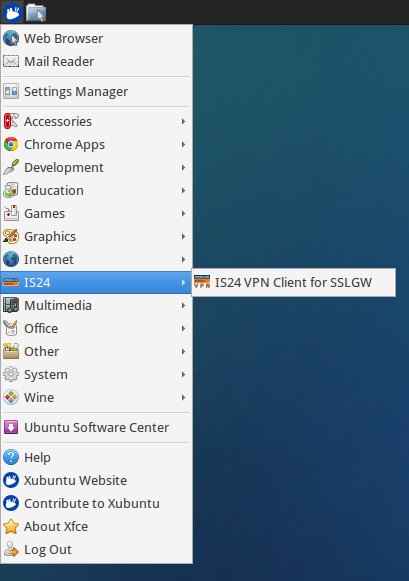
The "Start Menu" of a Linux Desktop usually comes with a predefined set of categories that make up the sub menus. If you have a lot of custom applications then you might want to group them under a dedicated sub menu instead of having them spread out over all the menu categories. Adding sub menus and new categories on Linux Desktops is defined in the Desktop Menu Specification in Appendix C . It turns out that it is really simple and the following example from ImmobilienScout24 can serve as a base for your own custom menu. You will need the following parts: A Desktop file using a custom category A Directory file defining the icon and description for the new sub menu The icon for the sub menu An XML file describing how to integrate the new sub menu into the menu structure and which categories of Desktop files to show in the new menu The Desktop file describes the menu entry, in this example the VPN client: The important part here is the Categories  entry whic...

Simple Video Presentation with Raspberry Pi

Image
Playing videos in an endless loop is a common problem: Product demos at a trade show or fair Infomercials in a public place or foyer Background fun at a party ... When I faced this problem at the last LinuxTag we did not want to take a full blown computer with us but make do with a Raspberry Pi . The question was how to turn the Pi into a simple video player with a minimum amount of fuss. The solution is simple and elegant: Install OpenELEC (an Kodi distribution) on a SD card Boot it up once in the Pi to initialize the storage partition Add the following file in the storage partition as .kodi/userdata/autoexec.py Add any amount of multimedia files in the storage partition under videos/ Boot up the Pi and enjoy your videos You can also interrupt the playback and use OpenELEC normally. To go back to the automatic playback simply reboot the system. And here is our booth with the demo videos in front: Update 2016-05-13: Adjust for Kodi instead of XBMC. Ev...

Simple file patching with sed

Patching configuration files is like the bread-and-butter job of every configuration management. In our package-based deployment world we try to minimize the patching to the absolute minimum, usually to "enable" modularized configuration patterns. The best example is the Apache Webserver, where we have a wrapper RPM package with a %post script that simply replaces (and not patches) the upstream configuration with a few include lines: Sadly there is still a lot of software that does not support includes in its configuration. For these we of course have to patch the existing configuration and use this short and simple config patcher in our RPM %post scripts, for example like this for sshd_config: The trick of this snippet is that in the end the changed parts are always at the top of the file. It is also important to always embed some information about the cause of the patch so that one can easily find out who or what is reponsible for the file. The %-variables are fil...

Automated OpenSSH Configuration Tests

Image
When developing or fine-tuning OpenSSH configurations the testing can be quite tiresome: Change configuration, restart server, run manual tests, repeat. Not to forget the many times when restarting the SSH server does not work and you lock yourself out of your test server. When writing a  Linux Magazin article about SSH key management  I wanted to show how to use OpenSSH PKI in a repeatable way. The result is an automated test suite for OpenSSH configuration : $ ./run_demo.sh    ... lots of info output running through ...   SSH PKI Demo Test Results: Succeeded create-ca-key Succeeded create-host-key Succeeded sign-host-key Succeeded create-user-root-key Succeeded sign-user-root-key Succeeded create-user-unpriv-key Succeeded sign-user-unpriv-key Succeeded test-trusting-known-hosts-via-cert-and-login-with-password Succeeded test-that-hostname-in-cert-must-match-target-host Succeeded test-login-with-root-key-trusted-by-cert Succeeded test...

SSH with Personal Environment

Image
A colleague, Eric Grehm, raised an interesting challenge: How to maintain his personal work environment (VIM settings, .bashrc ...) on all servers? The first thought was putting this somehow into our software distribution, but we quickly realized that this would trigger needless updates on hundreds of servers. The benefit would be that the personal work environment is already on every server upon first access. The next idea is to switch from a pre-installed personal environment to an on-demand solution where the personal environment is transferred each time a remote connection (over SSH) is established. A simple implementation would just to a scp before the ssh, but that entails two connections which takes more time and might also bother the user with a double password request. Side-channel data transfer An alternative is to piggyback the file transfer onto the regular SSH connection so that the personal environment is transferred in a side channel: On the client creat...

Rough Measurement for HTTP Client Download Speed

Image
Henrik G. Vogel  / pixelio.de Ever wonder if your website is slow because of the server or because of the clients? Do you want to know how fast is your clients' connection to the Internet? Don't want to use external tracking services, injecting JavaScript etc.? Why not simply measure how long it takes to deliver the content from your webserver to your users? Apache and nginx both support logging the total processing time of a request with a suitably high precision. That gives the time from starting with first byte received from the client and ending after the last byte sent to the client. To try out this idea I added %D to the log format for access.log of my Apache server and wrote a little Python script to calculate the transfer speeds. With the help of the apachelog Python module parsing the Apache access.log is really simple. This module takes a log format definition as configuration and automatically breaks down a log line into the corresponding values. ...
Like this content? You could send me something from my Amazon Wishlist. Need commercial support? Contact me for Consulting Services.