Posts

Showing posts with the label Raspberry Pi

Automated Raspbian Setup for Raspberry Pi
Image
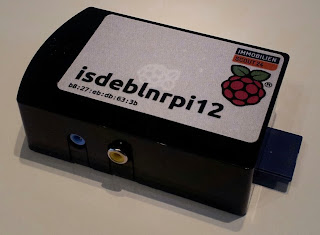
Update (2019):  https://github.com/schlomo/rpi-image-creator  is the new home of the code. Recently we got a whole bunch of Raspberry Pi systems at work - the cheapest platform for building Dashboards . Everybody loves those little cute boxes - but nobody wants to deal with the setup and maintenance. The kiosk-browser package is of course also the base of our Pi-based setup. But how does it get onto the Pi? The solution is a Bash script: rpi-image-creator  available on the ImmobilienScout24 GitHub project . It automates the setup of a Pi with Raspbian by downloading a Raspbian image, customizing it a bit and writing it to a SD card. The reason to write my own script where the following features: It creates the file systems on the SD card instead of dumping a raw image onto the SD card. That way the partitions are all aligned properly and have the right size from the beginning. No later resizing needed It removes all the stuff that Raspbian runs at the first boo...

Setting hostname from DHCP in Debian

Image
For our team monitors that use the Kiosk Browser on a Raspberry Pi I am building a Raspbian wheezy image. One requirement is that the system will configure the hostname from DHCP so that we can use the same image for all devices. Sadly, setting the hostname from DHCP is not  trivial in Debian, here is the result of my research into the topic. I found 2 things to be essential and learned both of them by analysing the dhclient script. 1. Set the hostname to localhost The first thing to do is to set the system hostname to localhost:     # echo localhost >/etc/hostname 2. Workaround for broken dhclient-script The dhclient-script has (IMHO) a bug: If there is an old DHCP lease with a hostname in the lease database (e.g. in  /var/lib/dhcp/dhclient.eth0.leases ), then the script will not  set the hostname from DHCP even if the system name is still localhost. To circumvent this bug simply create a dhclient enter hook to unset the old host n...

How To Create a Debian/Ubuntu Repository for DEB Packages

Initial Setup Required Debian packages: reprepro Create a directory for the repository and its configuration: $ mkdir -p repo/conf Create a conf/distributions configuration file like this: Put my putinrepo script into the repo or next to it: "Export" the repo to create the metadata files for the empty repo: $ repo/putinrepo.sh $ tree repo repo ├── putinrepo.sh ├── conf │   └── distributions ├── db │   ├── checksums.db │   ├── contents.cache.db │   ├── packages.db │   ├── references.db │   ├── release.caches.db │   └── version └── dists ├── precise │   ├── main │   │   ├── binary-amd64 │   │   │   ├── Packages │   │   │   ├── Packages.gz │   │   │   └── Release │   │   ├── binary-armel │   │   │   ├── Packa...

Dashboards Made Easy

Image
If you work at an agile shop you probably have seen something like this: You also find a lot about how people create those nice dash boards as a web page, but you almost never find out how to actually build the system that runs the dash board. Basically this is a task for digital signage, but "standard" solutions like Xibo seem heavily oversized for running an internal dash board. All we need is a Linux box running a browser and the screen staying on. As my team also wanted to have a dashboard, I  recently hat to build one and decided to put my effort into an Ubuntu package named  kiosk-browser  that can be found on the ImmobilienScout24 github page. The package turns a regular Ubuntu installation into a web-based dashboard. Now the effort to setup a new dashboard system has been reduced to these steps: Install a computer with Ubuntu. Build or download and install the kiosk-browser package.  Log on as a user and run this command: sudo tee /etc/defa...
Like this content? You could send me something from my Amazon Wishlist. Need commercial support? Contact me for Consulting Services.